One more run easily turns into ten in PolyTrack. This fast-paced, low-poly racing game perfectly captures the thrill of chasing milliseconds, offering physics-defying jumps, challenging loops, and a robust track editor that makes every perfect lap feel like a massive victory.
Game Overview
At its core, PolyTrack is all about high-speed time trials across creative, gravity-defying environments. When you first hit the play button, you're greeted with a track selection screen. While you can jump in anywhere, starting with "Summer 1" is the perfect way to warm up, featuring simple curves, a smooth U-turn, and a basic jump ramp to get a feel for the handling.
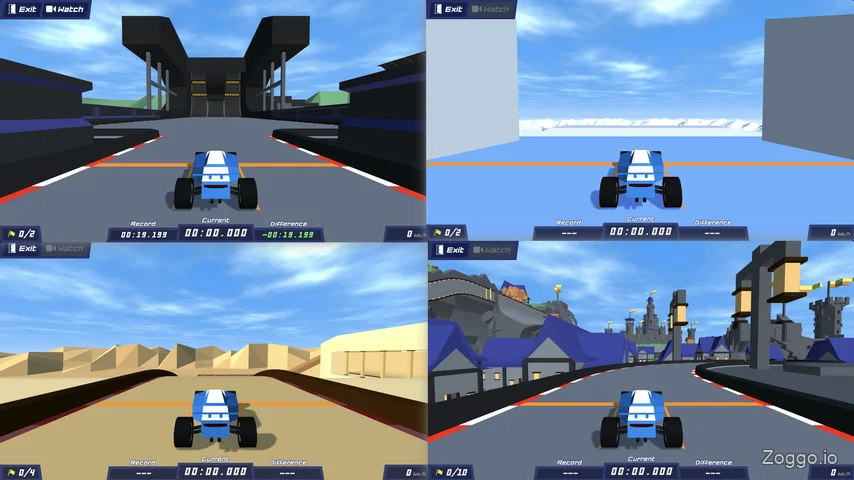
The game doesn't hold your hand with lengthy tutorials. You are immediately thrown into the driver's seat across three distinct official biomes: lush Summer, frosty Winter, and scorched Desert. Your goal? Master the racing lines, shave milliseconds off your personal best, and climb the leaderboards. Whether you are navigating official developer-made circuits or exploring the limitless and chaotic tracks built by the community, PolyTrack demands precision, patience, and a love for speed.
Control & How to Play
Getting your car off the starting line is simple, but managing your respawns is where the real skill lies.
Driving Controls:
- W / ↑: Accelerate
- S / ↓: Brake / Reverse
- A / ← & D / →: Steer left / right
- R / Enter: Quick respawn at the last yellow checkpoint line. (Press twice to restart the track entirely).
- T / Backspace: Instantly restart from the beginning of the track.
Editor Controls:
- Left-click: Place track piece
- Right-click + Drag / Middle mouse + Drag: Pan and rotate camera
- Shift + Scroll / Z / C: Adjust placement height
- R / Space: Rotate the selected track piece
- T: Test-drive your custom track
What Makes PolyTrack Fun
Instead of just racing against AI, PolyTrack thrives on personal progression and community creativity.
Rewarding "Aha!" Moments

Because there are no guideposts, figuring out a track's logic is incredibly satisfying. For instance, the start of "Summer 2" features a twisted, ascending ramp. Initially, you might fly off the edge, but by watching the lane assist lines, you realize you need to smoothly transition from the outer lanes into the middle lane to stay parallel with the road. Nailing that maneuver feels amazing and prepares you for harder tracks.
Intense Ghost Racing
You never have to race alone. By selecting players from the leaderboard, you can race against their recorded ghosts. It is the ultimate tool for visual learning, allowing you to see exactly where you are braking too early or taking a corner too wide.
The Checkpoint Rule (No Cheating!)
The game's physics might tempt you to get creative. During my runs on "Summer 5", I made a mistake, flew off the track, and accidentally landed on the second half of the circuit. Thinking I had discovered an epic shortcut, I drove to the finish line—only to find it didn't count. PolyTrack tracks your progress strictly through checkpoints. If you miss one, the game will persistently remind you to press R to go back.
Limitless Track Editor
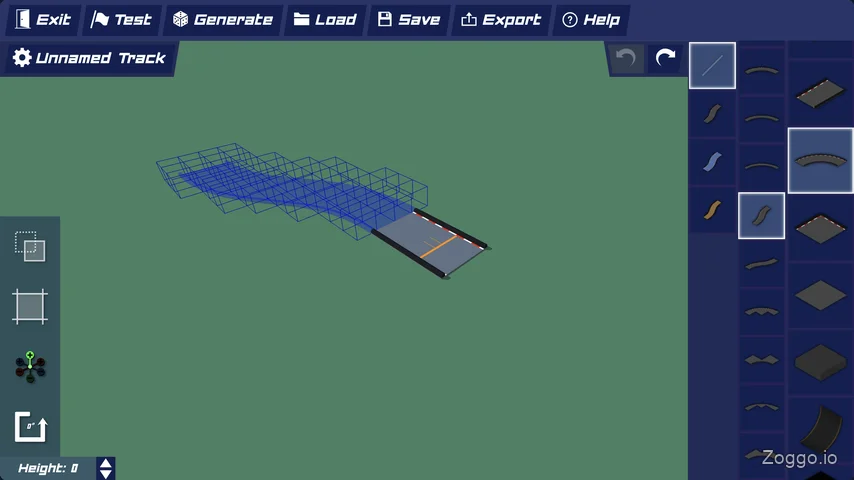
If you ever get tired of the official maps, the built-in level editor allows you to snap together loops, banked curves, and massive jumps. You can export your creations via a short code to share with friends on Discord or Reddit.
Tips & Strategy
If you want to dominate the PolyTrack leaderboards, keep these practical tips in mind:
- Beware the 'R' Key Momentum Trap: Pressing
Rto respawn at a checkpoint drops you with zero speed. Because cars in PolyTrack usually fly through these yellow checkpoint lines at high speeds, practicing a corner from a dead stop feels entirely different. UseRto learn the layout, but focus on stringing the whole track together cleanly for the best times.
- Scout First, Perfect Later: Don't restart every time you bump a wall on your first try. Complete a messy run first just to understand the track's full layout and where the finish line is.
- Watch Out for Blind Spots: On "Summer 7", you reach a point where the track drops vertically downward. I repeatedly crashed into obstacles trying to find the finish line. If you are totally stuck, don't be afraid to watch a YouTube replay to find the correct entry angles for tricky vertical drops.
- Tap, Don't Hold: For tighter cornering, repeatedly tap your steering keys (
A/D) instead of holding them down. This gives you micro-control over your angles. - Contrast Your Car: Your initial car color is generated randomly. If your green car is blending into the Summer biome grass and making it hard to track your racing line, hit the Customize menu to give it a bright, contrasting paint job.
FAQ
Q: Is PolyTrack similar to TrackMania?
A: Yes! PolyTrack is heavily inspired by TrackMania. It focuses on time-attack racing, chasing milliseconds, ghost replays, and features a robust block-based track editor, all wrapped in a browser-friendly low-poly style.
Q: Can I take shortcuts by flying off the track to the finish line?
A: No. While taking tight angles is encouraged, you cannot skip sections of the track. You must pass through every yellow checkpoint line in order. If you fly over one and land further down the track, the game will force you to respawn.
Q: Why am I so slow after respawning at a checkpoint?
A: When you press R to respawn, your car starts from a dead stop. To get leaderboard-worthy times, you need to maintain your momentum by completing the track smoothly from the starting line without respawning.
Q: How do I change my car's appearance?
A: You can change your vehicle's paint colors, wheel rims, and exhaust styles in the Customize menu on the main screen. This is especially helpful if your current color blends in too much with the track environment.
Q: Does PolyTrack have multiplayer?
A: You can compete asynchronously by racing against up to 10 player ghosts from the leaderboards at once.
Gameplay Video
Watch how smooth a clean run looks once you master the drifting and momentum mechanics. Here is a flawless run through the early Summer tracks.